2.Create Ansible Inventory for App Server Testing

Cloud & SRE specializing in AWS and DevOps. I share my ongoing learning journey through practical tutorials and insights. Let's grow together.
Lab Information
The Nautilus DevOps team is testing Ansible playbooks on various servers within their stack. They've placed some playbooks under /home/thor/playbook/ directory on the jump host and now intend to test them on app server 1 in Stratos DC. However, an inventory file needs creation for Ansible to connect to the respective app. Here are the requirements:
a. Create an ini type Ansible inventory file /home/thor/playbook/inventory on jump host.
b. Include App Server 1 in this inventory along with necessary variables for proper functionality.
c. Ensure the inventory hostname corresponds to the server name as per the wiki, for example stapp01 for app server 1 in Stratos DC.
Note: Validation will execute the playbook using the command ansible-playbook -i inventory playbook.yml. Ensure the playbook functions properly without any extra arguments.
Lab Solutions
STEP-BY-STEP SOLUTION
1️⃣ Create the inventory file
Run on the jump host:
vi /home/thor/playbook/inventory
Add the following inventory content:
[appserver1]
stapp01 ansible_host=172.16.238.10 ansible_user=tony ansible_ssh_pass=Ir0nM@n
Save & exit.
✔ Why this works:
stapp01 → required hostname according to wiki (server name)
ansible_host → correct IP for App Server 1
ansible_user → login user for that server
ansible_ssh_pass → its SSH password
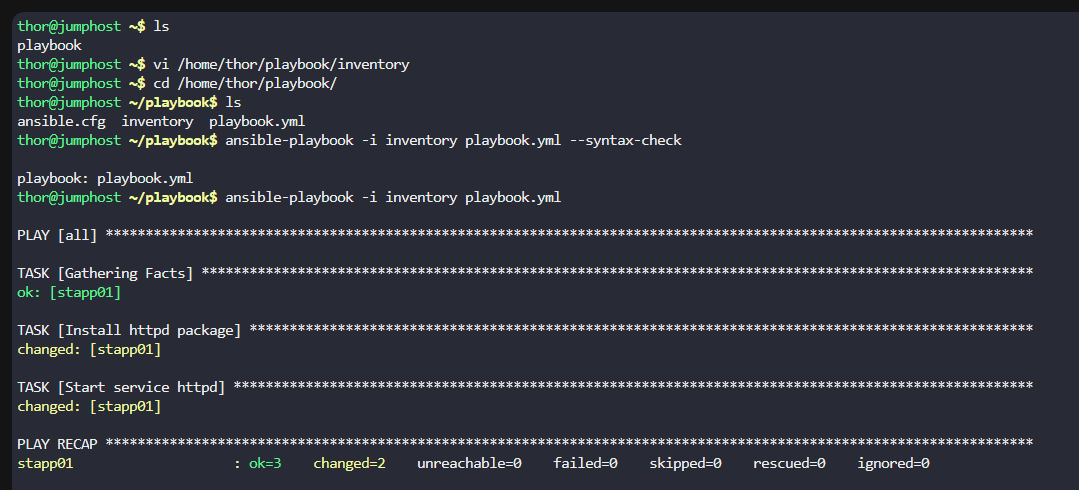
2️⃣ Ensure your playbook.yml exists
The validation will run:
ansible-playbook -i inventory playbook.yml
So the directory /home/thor/playbook/ must contain playbook.yml.
cd /home/thor/playbook/
ls
3️⃣ Test the syntax
From inside /home/thor/playbook/ run:
ansible-playbook -i inventory playbook.yml --syntax-check
Should output:
playbook.yml: OK
4️⃣ Run the playbook (optional self-test)
Before validation, you can test:
ansible-playbook -i inventory playbook.yml