1.Troubleshoot and Create Ansible Playbook

Cloud & SRE specializing in AWS and DevOps. I share my ongoing learning journey through practical tutorials and insights. Let's grow together.
Lab Information
An Ansible playbook needs completion on the jump host, where a team member left off. Below are the details:
The inventory file /home/thor/ansible/inventory requires adjustments. The playbook must run on App Server 3 in Stratos DC. Update the inventory accordingly.
Create a playbook /home/thor/ansible/playbook.yml. Include a task to create an empty file /tmp/file.txt on App Server 3.
Note: Validation will run the playbook using the command ansible-playbook -i inventory playbook.yml. Ensure the playbook works without any additional arguments.
Lab Solutions
Step-by-Step Ansible Lab Instructions
🟩 Step 1 — Create the playbook directory
mkdir -p ~/playbook
🟩 Step 2 — Create the inventory file
vi ~/playbook/inventory
Add the following content:
[app_servers]
stapp01 ansible_user=tony ansible_password=Ir0nM@n owner_name=tony
stapp02 ansible_user=steve ansible_password=Am3ric@ owner_name=steve
stapp03 ansible_user=banner ansible_password=BigGr33n owner_name=banner
✔ This defines all app servers ✔ It also maps each host to the correct owner
🟩 Step 3 — Create the playbook file
vi ~/playbook/playbook.yml
Add the following:
---
- name: Create /home/opt.txt on all app servers
  hosts: app_servers
  become: yes

  tasks:
    - name: Ensure /home/opt.txt exists with correct permissions and ownership
      file:
        path: /home/opt.txt
        state: touch
        mode: "0744"
        owner: "{{ owner_name }}"
        group: "{{ owner_name }}"
🟩 Step 4 — Verify your files
# Inventory:
cat ~/playbook/inventory

# Playbook:
cat ~/playbook/playbook.yml
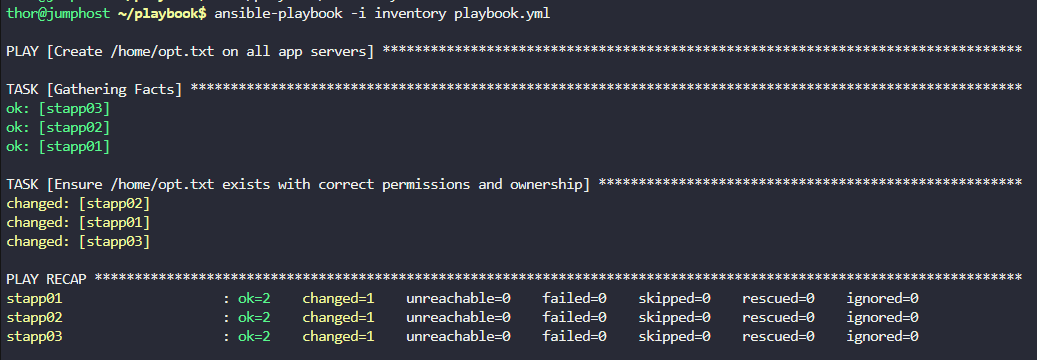
🟩 Step 5 — Run the playbook (Validation will do this automatically)
ansible-playbook -i inventory playbook.yml
This will:
✔ Create /home/opt.txt on all app servers ✔ Set file permissions to 0744 ✔ Assign correct owner/group per server:
stapp01 → tony
stapp02 → steve
stapp03 → banner