Day 22.Configuring Secure SSH Access to an EC2 Instance
Cloud & SRE specializing in AWS and DevOps. I share my ongoing learning journey through practical tutorials and insights. Let's grow together.
Lab Information
The Nautilus DevOps team needs to set up a new EC2 instance that can be accessed securely from their landing host (aws-client). The instance should be of type t2.micro and named devops-ec2. A new SSH key should be created on the aws-client host under the/root/.ssh/ folder, if it doesn't already exist. This key should then be added to the root user's authorised keys on the EC2 instance, allowing passwordless SSH access from the aws-client host.
Lab Solutions
Step-by-Step Solution
STEP 1: Create the EC2 Instance (AWS Console)
Log in to AWS Console (region us-east-1)
Go to EC2 → Launch instance
Configure:
Name: devops-ec2
AMI: Amazon Linux 2 (or Ubuntu)
Instance type: t2.micro
Key pair: You may select any (not important for this lab)
Security group:
Allow SSH (port 22)
Source: aws-client IP or 0.0.0.0/0 (lab safe)
Launch the instance
Wait until:
State: Running
Status checks: 2/2 passed
STEP 2: Generate SSH Key on aws-client Host
Type these commands in labs
whoami
hostname
Check if SSH key already exists:
ls /root/.ssh/id_rsa
If it does not exist, create it:
ssh-keygen -t rsa -b 2048 -f /root/.ssh/id_rsa -N ""
What this does
-t rsa → RSA key (lab requirement)
-b 2048 → key length
-f /root/.ssh/id_rsa → correct location
-N "" → no passphrase (required for passwordless SSH)
This creates:
Private key: /root/.ssh/id_rsa
Public key: /root/.ssh/id_rsa.pub
STEP 3: Copy Public Key Content
Display the public key:
cat /root/.ssh/id_rsa.pub
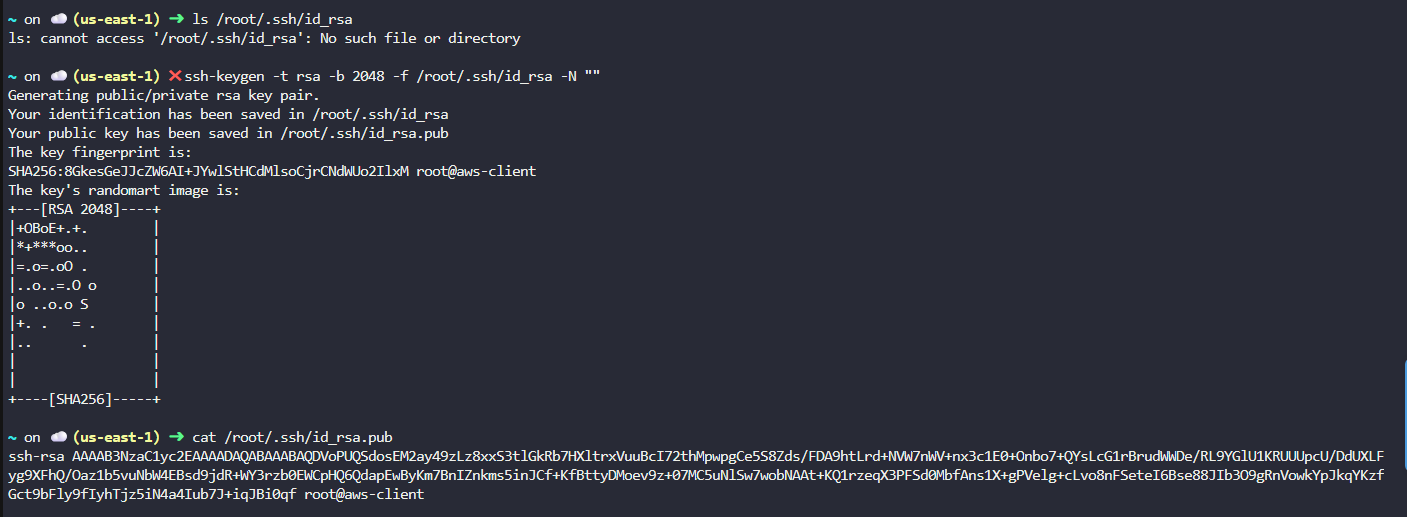
Copy the entire output (starts with ssh-rsa).
STEP 4: Add Public Key to EC2 Instance 4.1 Connect to EC2 instance (using console or existing key)
From AWS Console:
EC2 → devops-ec2
Use EC2 Instance Connect or existing SSH method
4.2 Add Key to root authorized_keys
On the EC2 instance:
sudo mkdir -p /root/.ssh
sudo vi /root/.ssh/authorized_keys
Paste the copied public key on a new line, then save.
Fix permissions:
sudo chmod 700 /root/.ssh
sudo chmod 600 /root/.ssh/authorized_keys
sudo chown -R root:root /root/.ssh
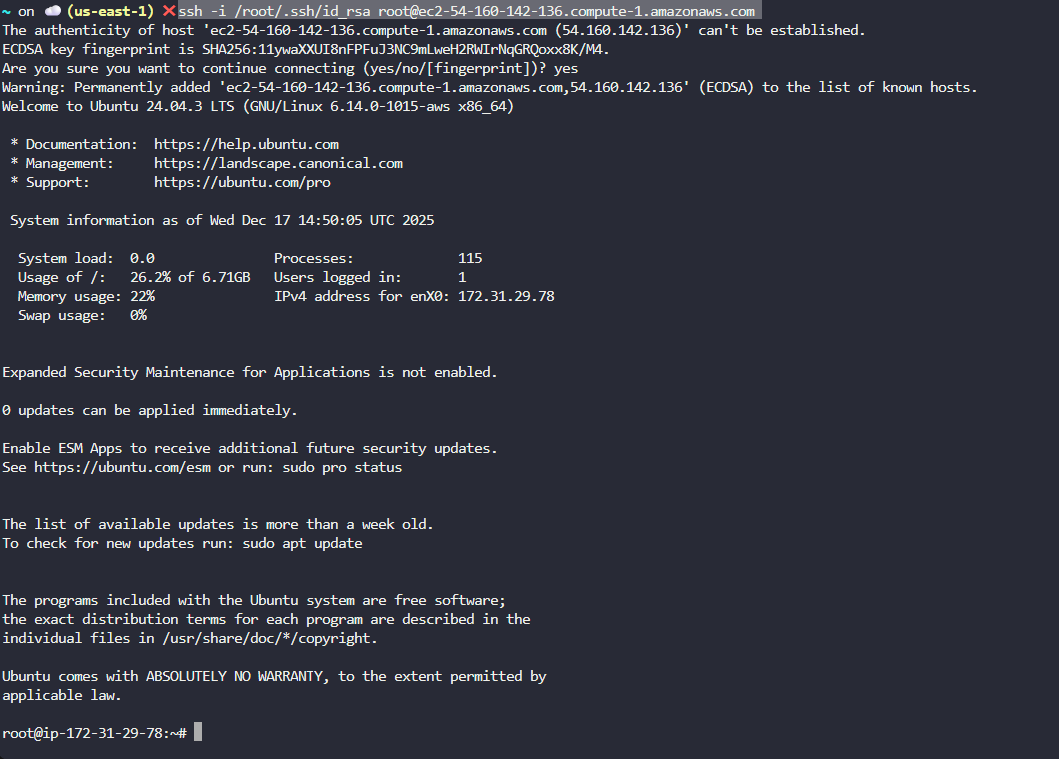
STEP 5: Test Passwordless SSH from aws-client
From aws-client host:
ssh -i /root/.ssh/id_rsa root@ec2-54-160-142-136.compute-1.amazonaws.com